"Buy this, choose a free accessory, and we'll add a free gift too." Promotions like that are everyday retail, and "can Xperience by Kentico do this?" is a fair question for anyone planning a store on it. There's no Buy X, Get Y promotion in the box yet, so the easy answer is "wait for the roadmap". I wanted to find out whether that's actually true.
So I took a fresh Dancing Goat sample site and set myself one rule: only use supported, documented extension points. No workarounds, no overriding Kentico's internals. Here's what happened.
What Can Xperience by Kentico Promotions Do Out of the Box?
Store managers create promotions under Promotions in the admin, with activation dates, target customers and optional discount codes. There are three types today:
- Catalog discounts: money off individual products. The best one wins per product.
- Order discounts: money off the whole order. One applies per order.
- Free shipping: delivery is free when the basket qualifies.
Kentico has two more types planned for the October 2026 refresh: cart item promotions, where the reward depends on what's in the basket, and free gift promotions, where a purchase earns a free product. Buy X, Get Y is exactly the kind of thing those are for.
Three Places a Custom Promotion Plugs Into Xperience by Kentico
Kentico supports all three, and none of them involve workarounds:
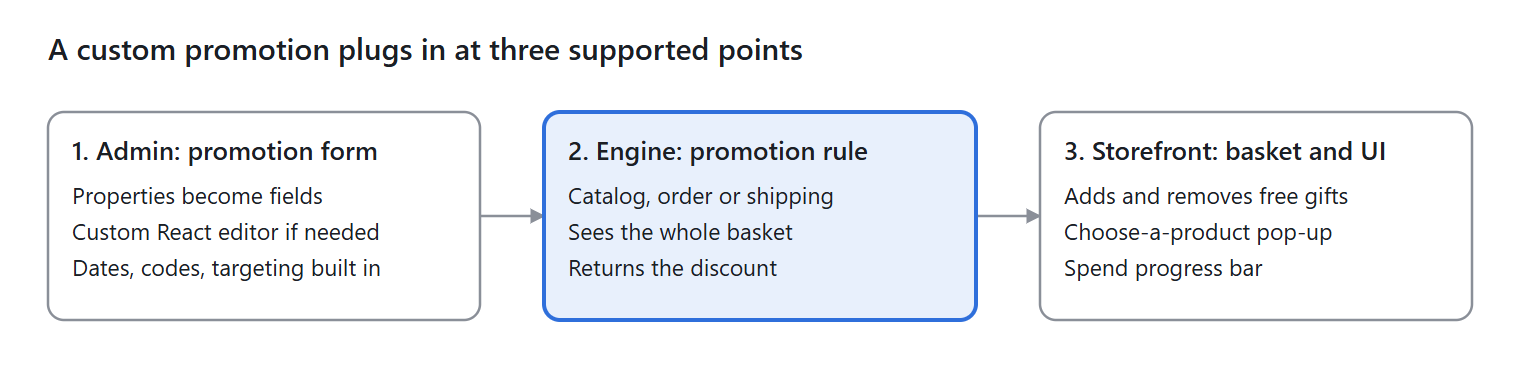
- The admin form. Every promotion uses a rule, and a rule has a properties class. Each property becomes a field that store managers fill in. You get the standard admin components (product pickers, dropdowns, number fields) for free, and you can build your own React components when you need something richer.
- The promotion rule. A small C# class decides whether the promotion applies and how much to take off. It sees the whole basket, so one product's price can depend on what else is in there. Register it with one attribute and store managers can choose it in the Promotions app.
- The storefront. Rules only calculate prices; they don't change the basket. Anything that does (adding a free gift, asking the customer to choose a product) is ordinary site code that reads the same promotion settings.
Underneath it all is the price calculation pipeline, which you can also extend with your own steps or replace step by step. I didn't need to touch it for this demo, which says a lot about how far the rules alone take you.
Setting Up Buy X, Get Y Without a Developer
The offer I built reads like this: spend $40 on selected coffee and accessories, choose two products at a discount, and get a free Chemex. Every part of that sentence is configurable by a store manager, with no developer needed once it's in place.
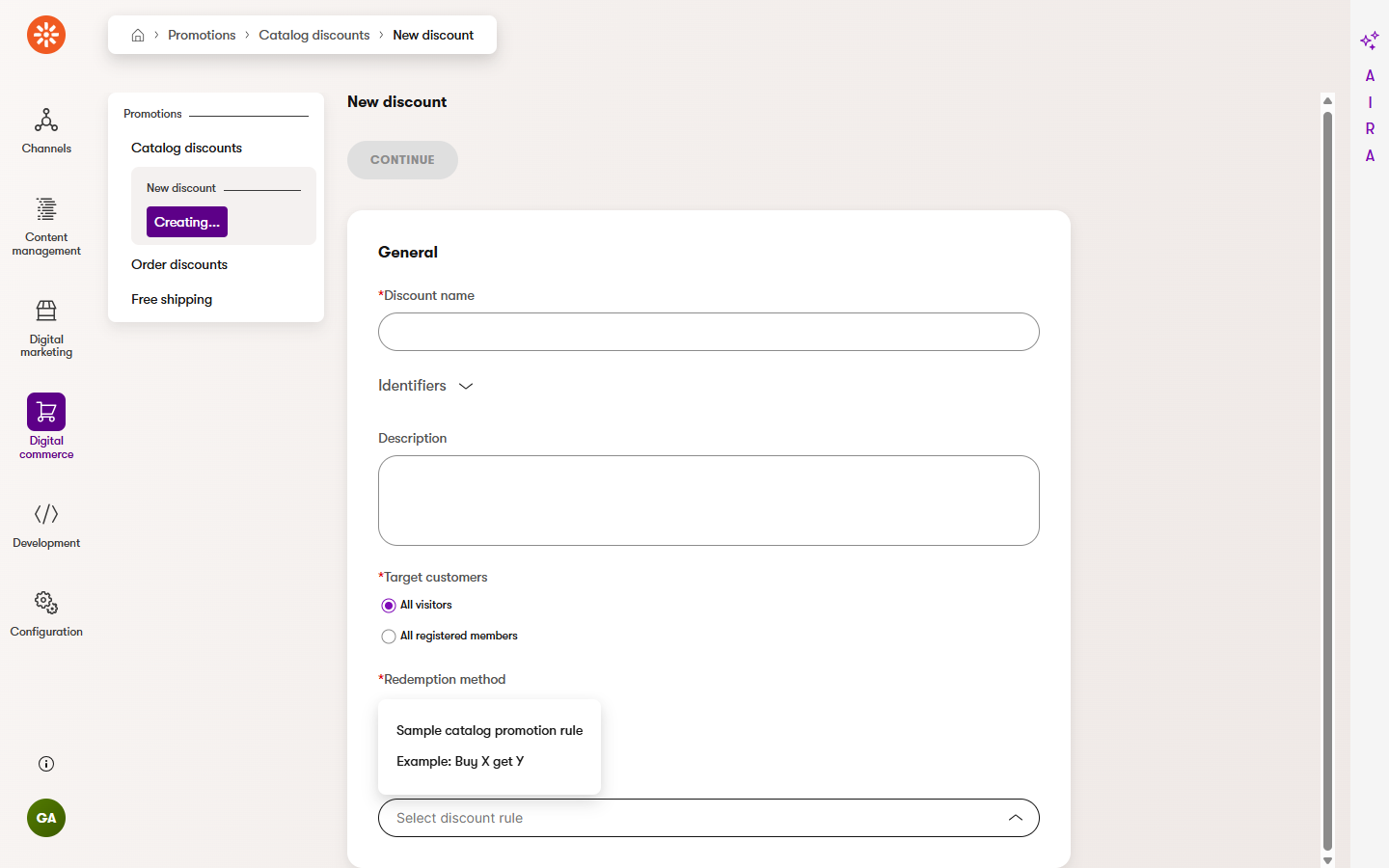
Picking the rule. Once the rule is registered in code, it appears in the Discount rule list when creating a catalog discount, right next to the sample rule Dancing Goat ships with. Dates, target customers and discount codes are standard settings on every promotion, so store managers use them as they always would.
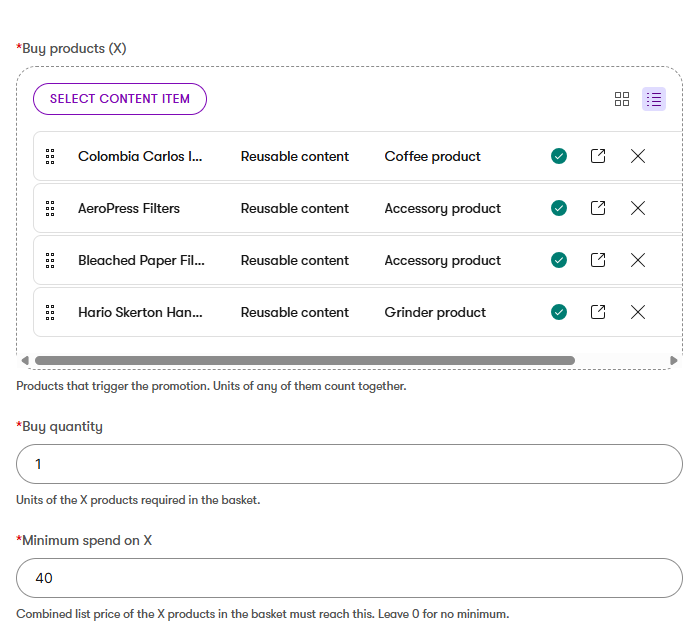
What triggers the offer. The store manager picks the products that qualify. Units of any of them count together, so the customer can mix and match. A buy quantity and an optional minimum spend decide when the offer unlocks. All three use standard admin components, with no custom UI needed.
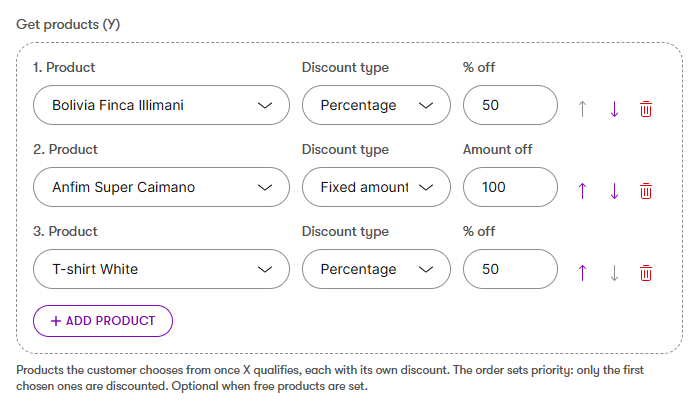
Products with their own discounts. Next come the products the customer chooses from. Here I wanted something the built-in fields don't offer: a list where each product has its own discount, fixed or percentage, and the order sets priority.
So I built a custom admin form component in React, using Kentico's own admin component library. It sits in the form like any other field and looks like it belongs there.
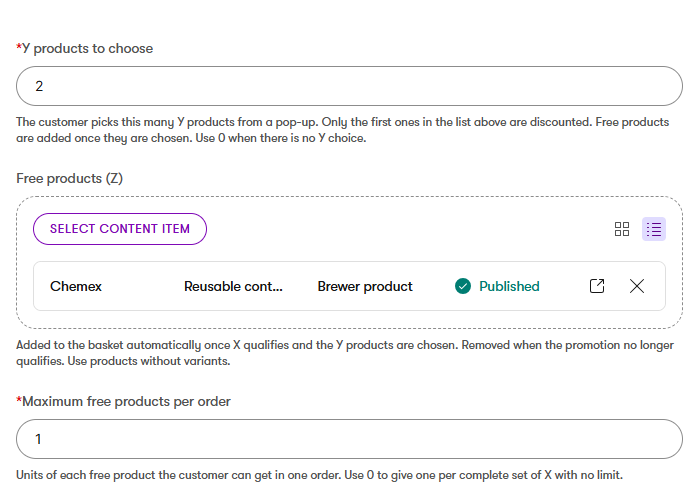
The reward. The last few settings decide what the customer walks away with: how many products they choose from the list above, which free gift is added automatically, and how many free gifts one order can get. Capping it at one stops a customer who buys ten qualifying products from getting ten free gifts.
What the Customer Sees: Progress, Choice and a Free Gift
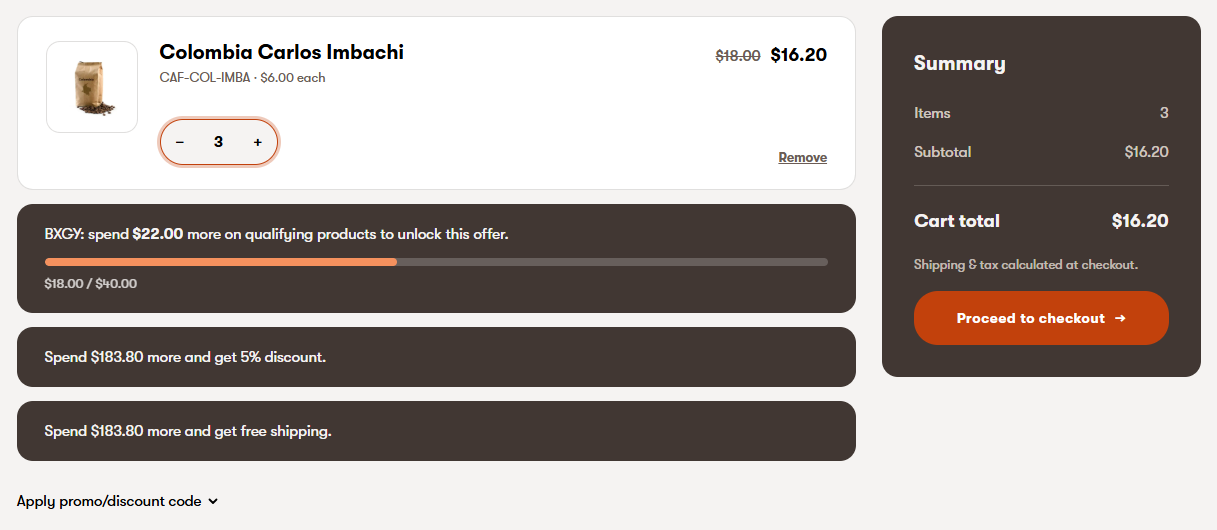
Progress towards the offer. When there's a minimum spend, the basket shows how far the customer has to go. It updates live as they change quantities, and sits alongside Dancing Goat's own upsell messages.
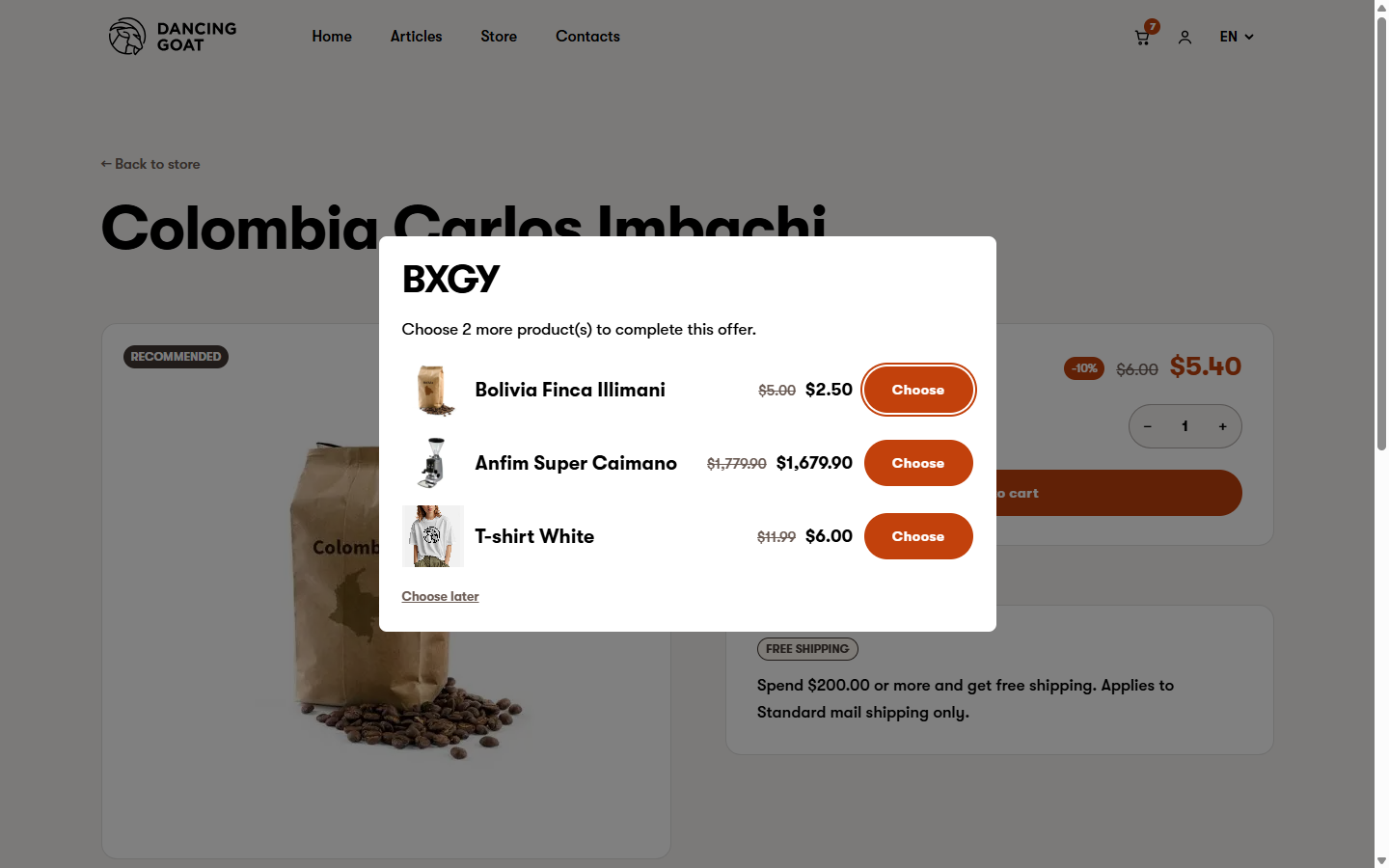
Choosing their products. The moment the basket qualifies, a pop-up asks the customer to choose. It opens on whichever page they're on, in this case the product page they just added from. Each option is priced by running the real price calculation, so what they see is exactly what they'll pay.
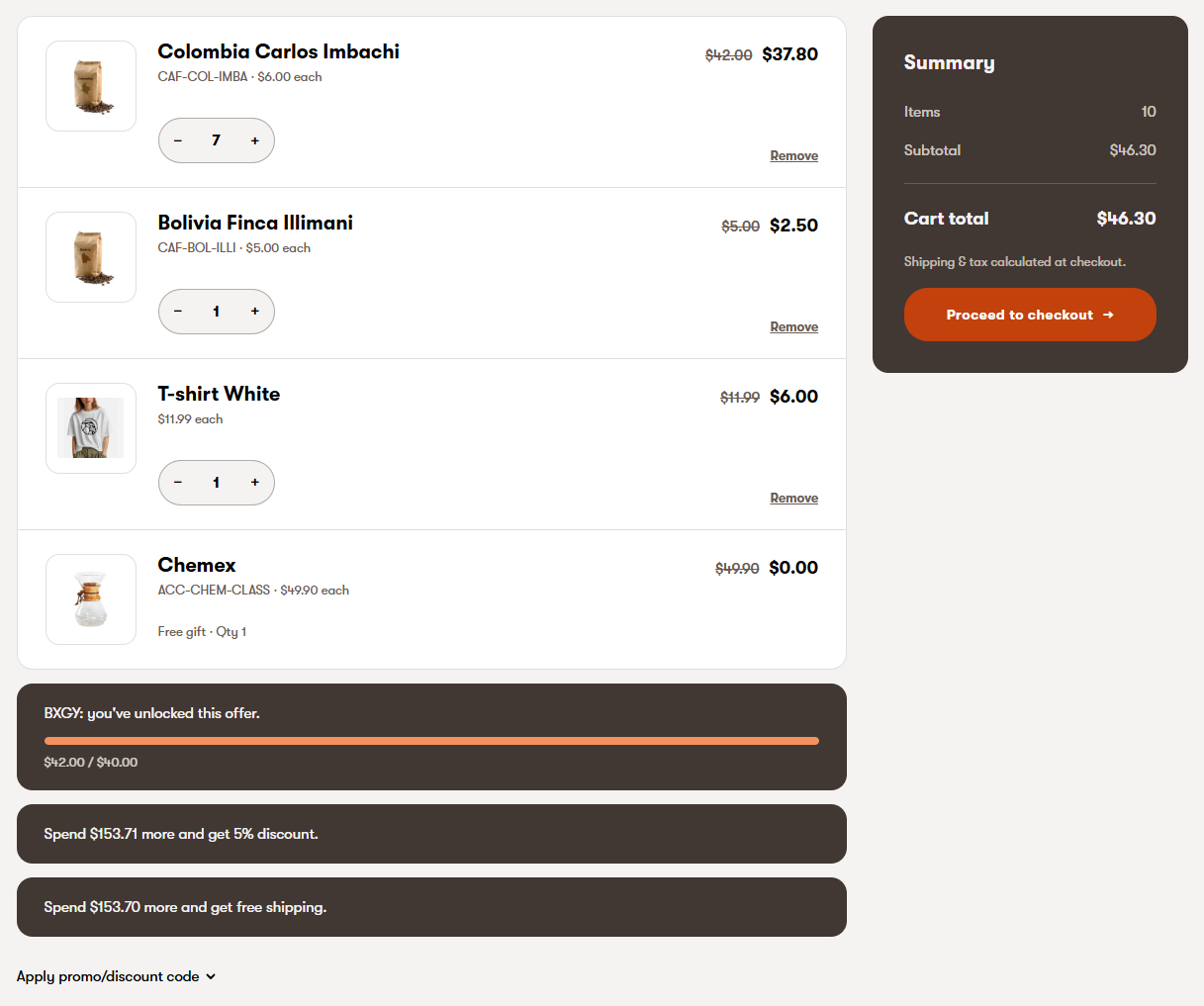
The free gift. Once the customer has chosen, the free gift drops into the basket at $0, locked so it can't be edited. Remove one of the chosen products and the gift disappears and the pop-up comes back. Drop below the spend threshold and the gift goes too.
Beyond Buy X, Get Y: Custom Order Discounts and Free Shipping Rules
Buy X, Get Y was the main example using catalog discounts, but I wanted to see whether the same approach held up for the other two promotion types too. So I built two smaller examples alongside it.
An order discount that only counts selected products. Think "10% off when you spend between $50 and $150 on brewing kit, but sale items don't get discounted twice." It's a common ask, and not something the standard order discount covers. With a custom rule, the store manager picks the qualifying products, sets the spend range and ticks a box so sale items still count towards the spend but aren't discounted again. The form only shows the settings that matter for this offer, which keeps it simple for whoever's setting it up.
Free shipping by language and postcode. Think "Free delivery over £200 on the UK site, except to remote postcodes." This one builds on Kentico's own free shipping promotion rather than replacing it, so the minimum spend, shipping methods and dates all work as normal. I just added two extra settings: which languages it applies to, and a list of postcodes to exclude. Set up one promotion per language and each market gets its own threshold.
Neither needed much code, and that's really the theme of this whole exercise.
Custom Promotion Rules Take Less Code Than You'd Expect
A custom promotion rule is a small piece of code with two jobs.
It describes the settings. Each setting is a line or two of code, and Kentico turns it into a field in the admin. These three settings are fields from the screenshots above:
[ContentItemSelectorComponent(typeof(ProductPromotionSchemaFilter), Label = "Buy products (X)")]
public IEnumerable<ContentItemReference> XProducts { get; set; }

[DecimalNumberInputComponent(Label = "Minimum spend on X")]
public decimal MinimumSpend { get; set; }

[ProductDiscountListComponent(Label = "Get products (Y)")]
public IEnumerable<DiscountedProduct> YOffers { get; set; }
It works out the price. For each product in the basket, the rule answers one question: does this promotion apply here, and if so, how much comes off? Because it can see the whole basket, it can say "this T-shirt is half price, because there's $40 of coffee in the basket".
Kentico's promotion engine handles the rest: dates, discount codes, target customers, and recording the discount on the order. And because one piece of logic decides the prices, the free gifts and the pop-up, they never disagree.
Should You Wait for the October Refresh?
The October refresh is only a few weeks away. If you want native support for Buy X, Get Y and free gift promotions, it's worth waiting for it and seeing what it covers out of the box.
But if you need these promotions today, you don't have to wait. Everything in this post was built with the extensibility Xperience by Kentico already offers, and the same approach covers spend thresholds on selected products, banded offers and market-specific free shipping too.
A few honest limits worth knowing before you start:
- Rules calculate prices; they don't change the basket. Anything that adds or removes products is your own code, as in this demo.
- Catalog discounts are per unit. A discount applies to every unit on a basket line, so "only the first one is discounted" needs extra work.
- Promotions don't stack freely. Each product gets its best catalog discount, and each order gets one order discount.
None of these stopped the demo, but they shape how you design a real implementation.
Final Thoughts
I started this expecting to write "wait for October". I'm finishing it convinced the commerce side of Xperience by Kentico is just as extensible as the rest of the platform, which is a big part of why I love working with Kentico. Custom rules, custom admin components and a little basket code got me here. Back in the Kentico 12 and Portal Engine days, a promotion like this meant overriding Kentico's built-in discount evaluators and fighting the commerce pipeline every step of the way.
I'm looking forward to seeing what the October refresh brings natively. Either way, the platform won't be what holds your promotions back.
If you're planning commerce on Xperience by Kentico, or weighing up a migration and wondering whether your promotions will survive the move, I'd love to hear what you're trying to build.